打开html文件的方法1
2http-server -c-1 或简写为 hs -c-1
parcel index.html
a标签
href属性
网址
1
2
3
4三种写法(推荐第三种)
http://baidu.com
https://baidu.com
//baidu.com 可自动选择用http或https协议路径
1
2/a/b/c 或 a/b/c
index.html 或 ./index.html其他用法
1
2
3
4
5
6
7<a href="javascript:;">点击后什么也不发生</a>
<a href="#ddd">找到id为ddd的标签</a>
<a href="mailto:jayce_ma.xa@foxmail.com">给某人发邮件</a>
<a href="tel="18912345678">打电话给某人</a>
target属性
内置名称
1
2
3
4_blank 在新窗口打开
_top 在最顶层打开
_parent 在当前页面的上一层打开
_self 在当前页面加载给窗口命名(作用是可重复利用窗口)
1
2
3
4<a href="//baidu.com" target="sss">baidu</a>
<a href="//bilibili.com" target="sss">b站</a>
若有window.name=sss的窗口,就用它打开,若没有就创建一个
与iframe一起的用法(在网页中内嵌窗口)
1 | <a href="//bing.com" target="xxx">必应</a> |
table标签
1 | <table> |
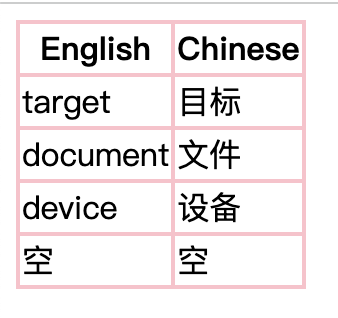
1 | <table> |
1 | <style> |
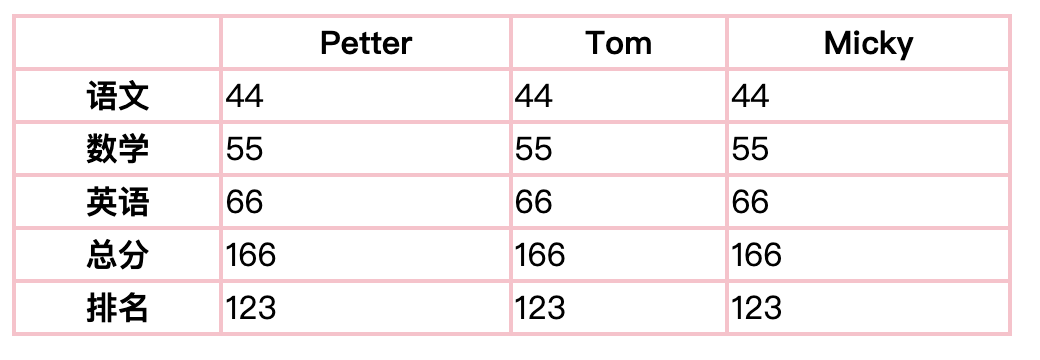
img标签
作用:发出get请求,展示一张图片1
2
3
4
5
6
7
8
9
10
11
12<img id="ccc" src="/brown-cat.jpeg" alt="棕色小猫" width="800"> //width和height是img标签的属性,!!切记只需设置一项,另外一个会自适应
<script>
ccc.onload = function(){
console.log("恭喜加载成功啦~")
} //监听图片是否加载成功
ccc.onerror = function(){
console.log("抱歉图片不见啦~");
ccc.src= "/404.png";
} //监听图片是否加载失败
</script>
1 | <style> |
form标签
作用:发出一个get或post请求,然后刷新页面1
2
3
4
5
6<form action="/yyy" method="POST" autocomplete>
//action用于控制请求哪个页面,method控制是POST还是GET
//autocomplete的用法:在form标签上加autocomplete,在input标签上加name=""
<input name="username" type="text" />
<input type="submit" value="" /> //默认是提交,给value赋值改变默认
</form> //form标签里必须含有一个type=submit的标签,这样表单才能提交
input标签
input与button标签的区别
1
2<input type="submit" value="搞起" /> //input标签里只能是纯文本
<button type="submit"><strong>搞起</strong></button> //button标签里还可以有其他标签input标签里type属性的取值
1
2
3
4
5
6
7
8
9
10
11<input type="text" required /> //required意为必须填写,否则不能提交
<input type="radio" name="gender" />男 //单选
<input type="radio" name="gender" />女
<input type="checkbox" name="hobby" />养猫 //多选
<input type="checkbox" name="hobby" />听歌
<input type="checkbox" name="hobby" />写代码
<input type="file" /> //选择单个文件
<input type="file" multiple /> //选择多个文件
其他输入标签
1 | <textarea style="resize:none; width:50%; height:300px;"></textarea> |